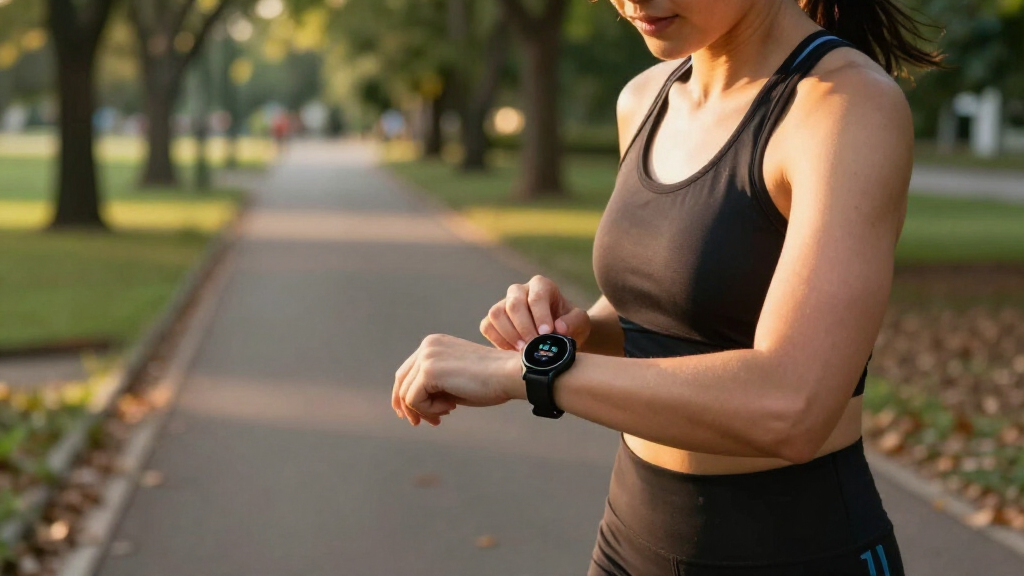

Choose a fitness tracker, connect it to your phone, and use its basic features to follow your daily movement. This guide is for beginners who want practical activity feedback without needing technical experience. Allow 30–60 minutes to compare options and set up the device, then a few minutes a day to review your progress.

Get workout gear delivered free with Prime
- Fast, free delivery on millions of items
- Prime Video, Amazon Music and more included
- Member-only deals all year

Google Fitbit Air – Screenless Activity Tracker, Obsidian
- ✔ Display: Screenless
- ✔ Battery life: Up to 7 days stated; 5-minute charge said to provide up to 1 day
- ✔ Water resistance: Listed to 50 meters

Fitness Tracker with 24/7 Heart Rate, Blood Oxygen Blood Pressure Sleep Monitor, Activity Trackers 5 ATM Waterproof,Step Calorie…
- ✔ Display: 1.10-inch AMOLED HD touchscreen
- ✔ Battery life: 10-day average listed; product description claims 10–14 days regular use
- ✔ Water resistance: 5 ATM claim in listing
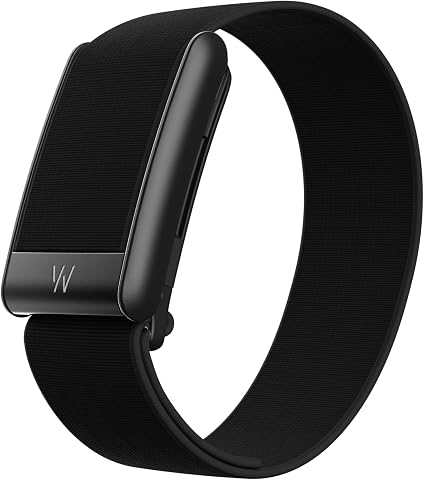
WHOOP 5.0/MG Screenless Fitness, Health, Sleep Wearable-12 Month Membership
- ✔ Display: Screenless
- ✔ Battery life: 14+ days stated
- ✔ Included membership: 12-month WHOOP One membership
Difficulty: Beginner | Time: 30–60 minutes for setup, then a few minutes a day
What You’ll Need
Tools & Materials:
- A fitness tracker or smartwatch with activity tracking
- A compatible smartphone, if the tracker requires an app
- The tracker’s charging cable and access to a power outlet
- A stable internet connection for downloading the companion app and updates
Knowledge:
- Basic smartphone skills, such as installing an app and changing settings
- A general idea of the activities you want to track, such as walking, cycling, or sleep
Check the tracker’s phone compatibility, subscription requirements, and battery life before buying. Trackers estimate activity and wellness metrics; they do not replace medical devices or professional advice.
Google Fitbit Air – Screenless Activity Tracker, Obsidian
For a beginner, the most useful tracker can be the one we remember to keep on. Fitbit Air’s screenless, micro-adjustable band is designed to sit quietly through work, exercise, and sleep, so activity tracking can become part of a routine without a watch face demanding attention. Its stated battery life of up to a week also means less frequent charging than a device that needs daily power. Compared with Zeacool, it trades instant on-wrist stats for a less distracting form factor and app-led tracking.The coaching story is a reason to choose it if you want prompts and interpretation alongside basic tracking. Google Health is described as providing adaptive coaching, with more personalized Gemini-built coaching tied to a separate Premium membership after a three-month trial. That subscription distinction matters: we should check which features are available without Premium before relying on coaching as the main reason to buy. Fitbit Air works with newer Android and iOS versions, but it requires a compatible phone and the supplied details do not describe built-in GPS; GPS functionality is via smartphone.Against WHOOP, Fitbit Air appears less centered on recovery scores and performance analysis, which may make it a calmer first step for broad everyday tracking. Its tradeoff is that the screenless design does not provide a quick glance at progress on the band itself. Choose it for comfort and routine; skip it if you want visible stats while walking or a more explicit recovery-training framework.
Pros:
- Micro-adjustable loop is designed for a secure fit through daily wear and sleep.
- Screenless design keeps the band visually simple and avoids constant on-wrist prompts.
- Up to a week of stated battery life, with five-minute fast charging said to add a day.
- Water resistance listed to 50 meters and compatibility with Android and iOS.
Cons:
- No screen for checking steps or workout information at a glance.
- GPS is via smartphone, so route tracking depends on carrying a compatible phone.
- Some personalized coaching is tied to a separately sold Premium subscription.
Best for: Beginners who want a comfortable, discreet tracker for everyday activity and sleep, and are comfortable checking their phone for insights.
Not ideal for: People who want an on-device display, detailed recovery emphasis, or coaching features without checking subscription terms.
Bottom line: Fitbit Air is our strongest first tracker for building a comfortable everyday habit, provided phone-based feedback and subscription boundaries fit your needs.
“Fitbit Air is our strongest first tracker for building a comfortable everyday habit, provided phone-based feedback and subscription boundaries fit your needs.”
Fitness Tracker with 24/7 Heart Rate, Blood Oxygen Blood Pressure Sleep Monitor, Activity Trackers 5 ATM Waterproof,Step Calorie…
If visible feedback helps us stay engaged, the Zeacool takes the most straightforward route in this group: a 1.10-inch AMOLED touchscreen puts watch faces and activity information on the wrist. The listing also describes 25 selectable sport modes and app-recorded steps, distance, and calorie estimates. That makes it a more immediate choice than screenless Fitbit Air, especially for someone who wants to check progress during a walk without reaching for a phone.Its broad feature list can look appealing to a new tracker owner, but we should separate everyday activity features from health claims. The listing names heart rate, blood oxygen, blood pressure, and temperature monitoring; it does not provide enough detail here to establish the accuracy or intended use of those readings. We would treat them as tracker estimates, not as a substitute for a medical device or clinician’s advice. Unlike WHOOP, this model is not presented around recovery coaching, so its appeal is more about a display and a collection of everyday functions than guided interpretation.The claimed 10–14 days of regular-use battery life is attractive, though the supplied specs list an average battery life of 10 days, so we would plan around the more conservative figure. Its 5 ATM water-resistance claim is another convenience for routine wear, but the precise conditions and limitations are not explained. Choose Zeacool if seeing a screen and trying multiple activity modes will help you form a habit. Consider Fitbit Air instead if you prefer a discreet band and a more defined smartphone ecosystem; consider WHOOP if sleep and recovery coaching are your priority.
Pros:
- 1.10-inch AMOLED touchscreen makes on-wrist information visible.
- Lists 25 selectable sport modes and app-recorded steps, distance, and calorie estimates.
- Magnetic charging and a stated 10-day average battery life.
- 5 ATM water-resistance claim and iPhone/Android compatibility are listed.
Cons:
- The listing does not explain the accuracy or medical status of blood pressure and other health readings.
- App details and phone compatibility requirements are less specific than Fitbit Air’s.
- The broad feature set may feel busy to someone who wants only simple step tracking.
Best for: Beginners who want a small color screen to view activity and select workout modes directly on the tracker.
Not ideal for: Buyers who prioritize a clearly documented app ecosystem, polished coaching details, or medically dependable blood pressure readings.
Bottom line: Zeacool is the most glanceable entry point here, but its health measurements and app details call for more caution than its screen and mode count suggest.
“Zeacool is the most glanceable entry point here, but its health measurements and app details call for more caution than its screen and mode count suggest.”
WHOOP 5.0/MG Screenless Fitness, Health, Sleep Wearable-12 Month Membership
WHOOP 5.0 is the most coaching-oriented option in this roundup. Instead of a display, it continuously collects activity and health signals and uses them to frame sleep, strain, and recovery. Its 12-month WHOOP One membership is included with the listed package, and the device is designed for continuous wear with a stated 14-plus-day battery life. For a beginner who wants to understand how training, sleep, and habits relate, that interpretation can be more useful than a simple step total.Compared with Fitbit Air, WHOOP describes a much more explicit performance and recovery system, including HRV-based recovery scores, sleep need and consistency, and personalized coaching through WHOOP AI. It also lists steps, heart rate, resting heart rate, respiratory rate, and VO2 max. That depth comes with a learning curve: there is no screen for immediate feedback, so we rely on the app and have to decide which scores matter to us. Beginners seeking a basic reminder to move may find the system more involved than necessary.The package includes a 12-month membership, which is a practical part of the buying decision because the product is built around its app and membership experience. We should understand what happens after that period before making it our long-term tracker. The included band and basic charger support the wearable routine, while the optional wireless PowerPack described in the listing is an upgrade. Compared with Zeacool’s visible display and selectable sports modes, WHOOP is better suited to people who want ongoing pattern analysis and accept screenless use.
Pros:
- Continuous wear design with a stated battery life of 14-plus days.
- 12-month WHOOP One membership is included with the listed package.
- Sleep tracking includes sleep stages, sleep need, consistency, and efficiency.
- App coaching and recovery framing connect multiple metrics and daily behaviors.
Cons:
- Screenless design means no immediate on-wrist stats or prompts.
- Recovery scores and many metrics may be more than a casual beginner needs to manage.
- The ongoing membership model should be considered beyond the included 12 months.
Best for: Data-motivated beginners who want to connect sleep, daily habits, and training effort through app-based recovery coaching.
Not ideal for: People who want a visible watch display, uncomplicated step counting, or a wearable experience that does not depend on a membership.
Bottom line: WHOOP is the most compelling choice for beginners who want structured recovery insights, but it is the least simple option for someone who only wants basic activity tracking.
“WHOOP is the most compelling choice for beginners who want structured recovery insights, but it is the least simple option for someone who only wants basic activity tracking.”
As an Amazon Associate we earn from qualifying purchases.
Before You Start
Decide what you want to track. Pick one or two priorities, such as daily steps, walking workouts, or sleep patterns. A short list helps you avoid paying for features you may not use.
Set a realistic expectation. Step counts, calorie estimates, sleep stages, and heart-rate readings can vary between devices and conditions. Use them to notice patterns over time, rather than treating each number as exact.
If you have a health condition, use a tracker only as a general activity aid unless a healthcare professional advises you otherwise. Stop wearing it if it irritates your skin, and follow the manufacturer’s guidance for cleaning and water exposure.
Step-by-Step Instructions
Step 1: Choose a tracker for your needs
Compare a few devices against your priorities. Check that the tracker records the activities you care about, works with your phone, and fits your budget. Look at battery life, screen readability, comfort, app costs, and whether the features you want require a subscription.
If you mainly want to build a walking habit, a basic step and activity tracker may be enough. If you want workout summaries or GPS routes, check whether the tracker has built-in GPS or uses your phone. Read the product’s water-resistance details before relying on it for swimming or wearing it in the shower.
Tip:Look for the manufacturer’s stated compatibility and water-resistance limits. “Water resistant” does not mean suitable for every depth, activity, or cleaning method.
Check: You can name the features you need, confirm the tracker works with your phone, and understand any recurring costs.
Step 2: Charge the device and install its app
Charge the tracker using its supplied cable and instructions. While it charges, find the companion app named by the manufacturer in your phone’s official app store. Check the developer name, install the app, and open it.
Grant only the permissions needed for the features you plan to use. Bluetooth is commonly required to connect the tracker; location access may be needed for route mapping. You can review or change permissions later in your phone settings.
Tip:Keep the tracker near your phone during pairing. If the app asks you to create an account, use a password you do not reuse elsewhere.
Check: The tracker has enough charge to complete setup, and the official companion app opens on your phone.
Step 3: Pair the tracker with your phone
Turn on Bluetooth, open the companion app, and choose the option to add or set up a new device. Select your tracker when it appears, then follow the pairing prompts on both screens. If a code appears, check that the same code is shown on the tracker and phone before confirming.
Keep the tracker close to the phone until the app confirms the connection. Allow any required firmware update to finish before wearing the device; do not close the app or power off the tracker during an update.
Tip:If the tracker does not appear, check that it is charged, Bluetooth is on, and it is not already paired to another nearby phone.
Check: The app lists the tracker as connected and shows its battery level or current status.
Step 4: Set your profile and basic goals
Enter only the profile details the app requests, such as age, height, or weight, and check them for typing errors. These details can affect estimates, but they do not make the tracker a medical measurement tool.
Choose a modest starting activity goal based on your current routine. If you do not know your typical activity level, use the first week to observe your usual pattern, then set a goal you can meet on most days. Enable reminders only if you find them helpful.
Tip:A goal that is easy to repeat is more useful at first than a sudden large increase. You can adjust it as your routine changes.
Check: Your profile is saved, and the app displays a daily goal that feels achievable for your current schedule.
Step 5: Wear the tracker correctly
Fasten the tracker snugly on your wrist, following the manufacturer’s fit guidance. It should stay in place during ordinary movement without pinching, leaving deep marks, or restricting circulation. For wrist-based heart-rate readings, the sensor generally needs steady contact with the skin.
Wear it in the position recommended for your device. If the tracker allows a dominant-wrist setting, select the wrist you use. Remove it for cleaning or if your skin becomes sore, and dry both your wrist and the device before putting it back on.
Tip:Very loose or shifting wear can make wrist sensor readings less consistent. Tighten the band comfortably before a workout, not so tightly that it hurts.
Check: The device stays in position as you move, and the band feels secure and comfortable.
Step 6: Record a short activity
Choose an activity you already do, such as a 10-minute walk. If the tracker supports workout recording, select the activity type and start it before you begin. Otherwise, let the tracker record your movement automatically.
Finish the activity in the device or app if you started it manually. Open the activity summary and review the duration and, if available, distance or heart rate. Treat these figures as estimates, especially if GPS or sensor contact was limited.
Tip:For route tracking, check whether your device needs location permission or a clear GPS signal before starting.
Check: The app or tracker shows an activity entry with a time or duration that matches your walk.
Step 7: Review your first week of data
Check the app once a day or at a time that suits you. Look at broad patterns, such as how often you walk or whether you meet your movement goal, instead of reacting to every fluctuation. If sleep tracking is enabled, wear the device overnight only if it is comfortable and the manufacturer permits it.
After seven days, compare your routine with your goal. Adjust the goal in small steps if it was consistently too easy or too difficult. Keep the settings simple until you know which summaries help you stay active.
Tip:Missing data can result from a low battery, a loose fit, or forgetting to wear the device. One incomplete day does not invalidate the rest of your week.
Check: You can find your daily activity summaries and identify at least one useful pattern from the week.
Common Mistakes to Avoid
- Choosing a tracker based on a long list of features instead of the activities you plan to do. — Write down your top one or two tracking needs first, then compare compatibility, comfort, battery life, and cost.
- Setting a demanding daily goal before learning your normal activity level. — Observe your activity for several days or a week, then choose a goal you can repeat consistently.
- Wearing the tracker too loosely or expecting exact readings. — Follow the fit instructions and use readings to compare patterns, not to diagnose a health issue or judge one isolated result.
- Assuming a water-resistance label covers swimming, hot water, or all cleaning methods. — Check the device’s specific limits and care instructions before exposing it to water.
Troubleshooting
Problem: The phone cannot find or pair with the tracker.
Solution: Charge the tracker, turn on Bluetooth, keep the devices close, and reopen the companion app. Check whether the tracker is still paired to another phone. Follow the manufacturer’s reset or pairing instructions if it remains unavailable.
Problem: Steps or workout data seem unusually low or high.
Solution: Check that the tracker is worn in the recommended position, that your profile and wrist settings are correct, and that the device has synchronized with the app. Compare several days before changing your goal.
Problem: The tracker’s battery drains quickly.
Solution: Check the app for a firmware update and review power-heavy features such as frequent notifications, always-on display, continuous GPS, or frequent heart-rate sampling. Disable features you do not use and follow the maker’s battery guidance.
Problem: The band irritates your skin or leaves a mark.
Solution: Loosen or remove the tracker, clean and dry the band and skin according to the manufacturer’s instructions, and let the skin recover. Try a different approved band if irritation returns; stop wearing it and seek medical advice for persistent or severe symptoms.
What Success Looks Like
You have a tracker that fits your needs and phone, the companion app shows it connected, and you can wear it comfortably. The device records at least one activity, and you can find that entry and your daily summary in the app. After a week, you can identify a basic activity pattern and set a goal that suits your routine. The readings serve as general estimates, not medical results.
Next Steps
Charge the tracker on the schedule its battery requires, sync it with the app regularly, and clean it as the manufacturer directs. Review your activity once a week and make small goal changes when your routine shifts. Turn off notifications or summaries that do not help you. If a tracker reading concerns you, discuss the concern with a healthcare professional rather than relying on the device alone.
Frequently Asked Questions
Do I need to wear a fitness tracker all day?
No. Wear it during the activities you want to track and at other times only if the data is useful to you. For consistent daily comparisons, try to wear it at similar times, while taking it off when needed for comfort or care.
Can a fitness tracker accurately measure calories burned?
Calorie figures are estimates and can differ from actual energy use. Use them as a rough trend if helpful, and avoid treating them as a precise food or health target.
Should I use a tracker’s sleep score to judge my sleep health?
Use sleep summaries as general observations, since consumer trackers can misclassify sleep stages. If you have ongoing sleep concerns, talk with a healthcare professional.
Can I use a fitness tracker without a smartphone?
Some devices show steps and basic activity directly on the tracker, but setup, detailed summaries, and syncing often require a compatible phone. Check the model’s requirements before buying.
How often should I change my activity goal?
Review it after about a week of typical use, then adjust gradually if it is consistently too easy or too difficult. You do not need to raise it on a fixed schedule; choose a target that fits your health and routine.