
TL;DR

Get workout gear delivered free with Prime
- Fast, free delivery on millions of items
- Prime Video, Amazon Music and more included
- Member-only deals all year
When choosing a heart rate chest strap, check how it measures heart rate, whether it connects to your watch or training app, and whether its fit and upkeep suit your routine. Chest straps use electrical signals at the chest and can respond quickly to changes in effort, but fit, electrode contact, and device condition affect readings. Compare battery, water use, extra metrics, and total cost before buying.
A watch can tell you your heart rate is climbing, but during a hard interval its reading may lag behind the effort you already feel in your legs. A heart rate chest strap reads electrical signals through sensors against your skin, giving it a different way to track each beat. That makes it a popular choice for workouts with quick changes in pace.
Choosing one still takes a little care. A strap that slips, pairs with only one of your devices, or needs more upkeep than you expect can end up in a drawer. You’ll learn what to check for fit, connectivity, responsiveness, battery, water use, and price, with practical examples to help you match the strap to your routine.
A chest strap can support training, but it does not directly measure fitness, calories burned, or readiness. Watches and apps may estimate those figures using heart rate and other information. If you have heart symptoms or a medical condition and want to monitor your heart rate, discuss the right approach with a qualified clinician.
Check whether the strap supports Bluetooth, ANT+, or both, and confirm connection limits for your watch, phone, bike computer, and apps.
Choose a snug, comfortable fit; wetting the electrodes slightly before exercise can improve contact before sweat builds up.
Compare battery type, cleaning instructions, replacement straps, and paid app features as part of the total cost.
Water resistance does not guarantee reliable underwater transmission, so check whether your chosen model records and syncs swim data.
Use heart rate as workout feedback; a chest strap does not directly measure fitness, calorie burn, or training readiness.
What to Look for in a Heart Rate Chest Strap
Choose a strap that fits your routine, connects to your devices, and gives useful heart rate feedback during changing effort.
Match the reading to your workout
Chest straps detect electrical signals through skin contact; wrist sensors use light to estimate blood flow.
- Can respond quickly when effort changes
- Useful for intervals, running, and cycling
- Needs good fit and electrode contact
- Convenient for everyday use
- May lag during rapid changes in effort
- Estimates blood flow with light
Check your connection setup
Confirm the strap works with each device and app you plan to use.
| What to check | Why it matters |
|---|---|
| Bluetooth | Common connection for phones and apps |
| ANT+ | May suit compatible watches and bike computers |
| Connection limits | Some straps allow only one Bluetooth connection at a time |
Prioritize fit and contact
A snug strap that stays put helps support consistent readings without restricting breathing.
Wear it snugly below the chest so it does not slip or pinch.
Slightly wetting them before exercise can improve contact before sweat builds up.
For erratic or missing data, check fit, contacts, battery, and pairing.
Compare ownership details
Features and upkeep vary by model, so check current specifications before buying.
Battery type
Compare replaceable coin-cell and rechargeable options.
Cleaning and fit
Check washing instructions and replacement strap costs.
Swimming use
Water resistance does not guarantee reliable underwater transmission.
Extra metrics
Some features need a compatible watch or app and may add cost.
Choose the right kind of heart rate reading for your workouts
A heart rate chest strap measures electrical activity from the heart through sensors that touch your skin, while most wrist monitors use light to estimate blood flow. That difference can help a chest strap respond quickly when your effort changes, especially during intervals. It still needs good contact to give useful readings.
Think of the two methods like following a song: a chest strap listens for the beat directly, while a wrist sensor estimates the rhythm from another signal. Neither method wins in every situation. Your wrist watch may be easier for an easy walk, while a chest strap may give you a clearer picture during repeated sprints or fast changes on a bike.
For instance, you run one minute hard, then jog easily for two minutes. Your breathing shifts before the wrist reading catches up, while a well-fitted strap may show the rise and fall more promptly. That quicker response can help you judge whether recovery is happening between efforts, but the number alone cannot tell you why your heart rate changed or whether the workout is safe. The numbers are still workout data, not a diagnosis or a direct measure of how fit you are.
Accuracy depends on the strap’s quality and condition, plus how it sits on your body. Dry electrodes, a loose fit, or residue on the contacts can cause erratic or missing readings. If you see an implausible spike during an easy warm-up, check contact and fit before changing your training based on that number. This matters because a bad reading can make an effort look harder or easier than it felt, leading you to adjust pace for the wrong reason.
Products Worth Considering

Garmin Forerunner 265S 42 mm GPS Running Watch, Light Pink and Powder Gray

Garmin Forerunner 570 GPS Running Smartwatch, 42 mm, Raspberry, with P-Bank Bundle

Garmin Forerunner 165 GPS Running Smartwatch, 43 mm, Whitestone
As an affiliate, we earn on qualifying purchases.
Check Bluetooth and ANT+ before you count on a connection
A strap is useful only if it sends data to the device you plan to use, so check its Bluetooth and ANT+ support before buying. Bluetooth is common in phones and apps, while ANT+ is found on some watches and bike computers. A strap may support one, both, or neither of the protocols your setup needs. Compatibility determines whether heart rate appears where you need it; a feature-rich sensor is of little use mid-ride if your bike computer cannot receive its signal.
Make a short list of the devices you use: perhaps a watch for runs, a phone for indoor cycling, and a bike computer for weekend rides. Then confirm compatibility for each exact model, not just the product category. Some straps allow more than one Bluetooth connection at once; others have a one-connection limit. ANT+ may offer another way to connect if several compatible devices are nearby. Think through your actual setup: simultaneous connections save the hassle of re-pairing, while a single connection may be perfectly adequate if you use only one receiver at a time.
Imagine you start a ride with the strap paired to your phone, then turn on a bike computer that also expects a Bluetooth connection. If the strap supports only one Bluetooth connection, one device may fail to receive data. That is a connection limit, not necessarily a broken strap. Check whether your devices can use ANT+ or whether you need to disconnect one device first. If you often record the same session on two devices, this limitation can affect which record has heart rate data and add steps before every workout.
App support also matters. Some workout machines and training apps accept a heart rate feed directly; others need a particular connection method or a compatible watch in the middle. Before paying, check the maker’s current specifications and your app’s requirements. Feature names alone can sound similar while hiding different connection limits. Confirming the path from strap to app helps avoid buying a sensor that technically connects but cannot deliver data to the screen or service you rely on.
| What to check | Why it matters |
|---|---|
| Bluetooth | Often connects directly to phones, apps, and newer wearables. |
| ANT+ | May suit a compatible bike computer or let multiple receivers read the signal. |
| Connection limit | Determines whether you can use multiple receiving devices at the same time. |
Find a fit that stays put without making you think about it
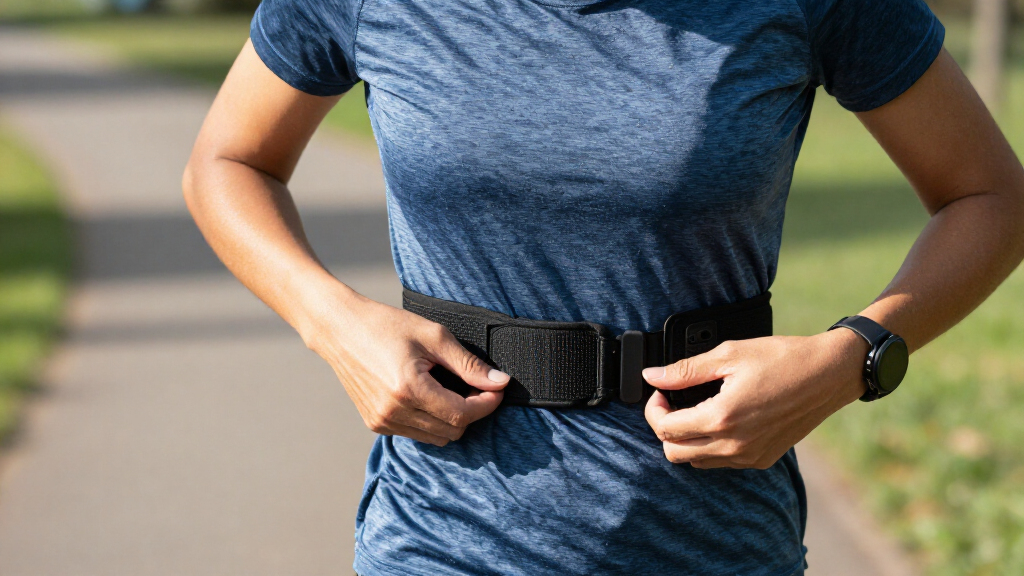
The right chest strap sits snugly below your chest, stays in place as you move, and does not restrict your breathing. You want stable sensor contact, not a band tight enough to feel like a belt cinched before dinner. Adjustable length, soft material, and a low-profile sensor can make it easier to wear through a full session. Comfort is not just a preference: if a strap rubs or slips, you may spend the workout adjusting it, and inconsistent contact can undermine the readings you bought it for.
Fit changes how the reading works. If the strap slides down during a run, its sensors may lose contact and the numbers can jump or disappear. If you tighten it too much, the band may rub or feel distracting. Try adjusting it before you start moving, then take a few deep breaths and reach overhead to check that it stays secure without pinching. The goal is enough tension to keep the electrodes against your skin through movement, with room for your chest to expand comfortably.
For instance, a cyclist may find a strap comfortable on a steady indoor ride but notice it shifts under a loose jersey on a bumpy road. A runner may care more about chafing around the edges after several kilometres. These details matter more than a feature list if a distracting strap changes how freely you move. A fit that works for one activity may not work for another, so consider where the band sits under the clothing you usually wear.
If readings seem unreliable before you have worked up a sweat, slightly wet the electrodes where they touch your skin. That can improve contact at the start of a workout, when dry skin may prevent a clean signal. Check that the strap lies flat and that the sensor sits in its intended position. Comfort is personal, so consider adjustable sizing and the maker’s cleaning and fit instructions.
A comfortable strap is one you can wear without repeatedly tugging at it. Check its feel during a short, ordinary workout before relying on it for a long session. A brief trial can reveal rubbing or slipping that a size chart cannot predict.
Compare battery, cleaning, and replacement costs
Look beyond the purchase price and check whether the sensor uses a replaceable coin-cell battery or a rechargeable one, how the strap attaches to the sensor, and how the maker says to clean it. Battery life varies by model and use, so the product’s stated figure is a guide rather than a promise that applies to every training week. A replaceable cell can be convenient when it runs out far from a charger, while rechargeable power avoids buying cells but requires you to remember charging. The better option is the one that fits your habits and access to power.
A removable sensor can make washing the fabric strap simpler, but the fastening points and instructions differ. Sweat and residue can build up on the strap or electrodes, sometimes interfering with contact. Rinse or wash the band as directed, remove the sensor when required, and let the parts dry fully before you store them. A simple care routine helps preserve comfort and contact; ignoring it may leave the strap unpleasant to wear and make readings less dependable.
Picture a runner who finishes a hot summer workout, tosses the strap damp into a gym bag, and forgets it until the next week. The stale smell is unpleasant, and trapped residue can also make reliable contact harder. A quick rinse and a few minutes of drying can fit easily into the routine, as long as that matches the manufacturer’s care directions. If the band requires more involved washing than you will realistically do, that upkeep is part of its cost too.
Compare likely running costs too: a replacement strap, batteries, charging habits, and any paid app features linked to the sensor. A low upfront price may not tell the whole story if you need a new band often or pay for an add-on to use a metric. On the other hand, a rechargeable battery may not suit someone who prefers a quick coin-cell swap. Choose the upkeep you will actually remember, and weigh recurring expense against the convenience or information each feature gives you.
- Check the power type and what the maker says about battery life.
- Confirm cleaning instructions and whether the sensor detaches from the strap.
- Price likely replacements, batteries, and any paid app features before you decide.
Match water resistance and extra metrics to real needs
If you train in heavy rain, sweat heavily, or swim, check the strap’s stated water-resistance rating and whether it records heart rate during swimming. Water resistance does not automatically mean the strap transmits data reliably underwater. A spec that protects a device from water says something different from a promise of uninterrupted signal in a pool. For swimming, that distinction affects whether you see live readings during the session or get a record only after syncing; decide which outcome is useful to you.
For example, a swimmer may finish a session and find that the strap recorded the workout for later syncing, even though a watch did not receive a live reading at every length. Someone running in light rain may care mostly that the sensor keeps working and is easy to dry afterward. Check the specific model’s recording and syncing behaviour rather than assuming every water-resistant strap works the same way. Also consider whether post-workout data is enough for your purpose, since a live feed may matter more for pacing or coaching cues.
Some straps or their connected apps also offer running dynamics, breathing rate, or other workout information. These extras can be useful if you already have a compatible watch or app and know how you would use the data. They are not automatically included with every strap, and the way each metric is measured can vary. More numbers do not necessarily make a workout easier to interpret; a metric earns its place when it helps answer a specific question or change a training choice.
A recreational runner who only wants to compare heart rate during easy and hard efforts may gain little from extra figures on a crowded screen. A more experienced runner might value an additional metric if their current device can show it clearly. Keep the decision grounded: consider whether the feature answers a question you already have, and verify that your receiving device supports it. Otherwise, you may pay for data that is difficult to access or interpret without improving your routine.
Make a short pre-buy checklist that narrows your options
The simplest way to choose a strap is to start with your workout, receiving device, comfort needs, and budget, then rule out models that miss one of those basics. That keeps a pile of technical specifications from becoming a guessing game. Write down your must-haves before comparing extras. This order helps because a failed basic—such as an incompatible connection or an uncomfortable band—can make every advanced feature irrelevant.
Suppose you mainly ride indoors with a phone app and sometimes run with a watch. You would first confirm the strap works with both receivers, then check whether it can connect to them at the same time. If it cannot, decide whether you are happy to switch connections or prefer another model. That one detail may matter more than an extra metric you will never open. The right choice depends on whether the small setup hassle is acceptable in your routine, not just on what the specification sheet offers.
- Name your main activity. Intervals, cycling, casual walking, and swimming can call for different features.
- List each device and app you want to use, then verify protocol and connection support.
- Check the wearing experience: adjustability, material, sensor profile, and cleaning method.
- Compare ongoing costs, power type, replacements, and features that require a paid app.
- Try a normal workout and see whether the strap stays comfortable and gives sensible readings.
This checklist also helps you decide whether you need a strap at all. If your smartwatch already gives readings that suit your easy runs and walks, a chest strap may add little. It may make more sense when wrist readings feel inconsistent during intervals or when you want a responsive heart rate feed for a compatible bike computer. In practical terms, the strap is worth adding when its faster response or device compatibility solves a real limitation you notice often enough to justify the extra care and cost.
Use the numbers as workout feedback, not a health verdict
A chest strap provides heart rate data; it does not directly measure your fitness, calorie burn, or training readiness. A watch or app may estimate those other figures using heart rate and additional information. Treat a number as one piece of feedback about a workout, not a score that defines your ability or worth. That distinction matters because estimates can look precise on a screen without measuring the underlying condition directly.
For instance, if you compare two easy runs, one might show a higher heart rate because it was warmer, you slept poorly, or the route climbed more. The reading can help you notice a pattern, but it does not explain the cause by itself. You can also use perceived effort: whether you can talk comfortably, how your breathing feels, and whether the pace seems sustainable. Looking at several clues together gives the heart rate context and reduces the chance that one unusual reading drives a training decision.
Chest straps are designed for exercise tracking, and most are not intended for all-day or sleep monitoring. A watch or another wearable is often more practical if you want continuous daily tracking. A chest strap may also be a poor fit for a workout routine that involves frequent breaks to adjust equipment or clothing. Matching the device to the job helps keep tracking useful without turning ordinary activity into a series of interruptions.
If you have heart symptoms, a known medical condition, or a specific reason to monitor your heart, talk with a qualified clinician about what device and readings are appropriate for you. A consumer chest strap is not a medical diagnostic device. Use fitness data to support your training choices, not to diagnose a health concern or replace professional guidance.
Frequently Asked Questions
Are chest straps more accurate than wrist heart rate monitors?
Chest straps use electrical signals, while most wrist monitors use light to estimate blood flow. A strap can respond more quickly during rapid changes in effort, such as intervals, but readings still depend on fit, electrode contact, and device condition. A wrist monitor may be more convenient for everyday use.
How do I stop erratic or missing readings?
Slightly wet the electrodes, adjust the strap so it stays snug, and clean the contacts according to the maker’s instructions. Check the battery and confirm that the strap is paired with the device you intend to use. If the reading remains odd, inspect the strap and sensor for wear or damage.
Can I use one strap with my watch, phone, and bike computer?
Often, but it depends on whether the strap and each receiving device support Bluetooth, ANT+, or both. Some straps allow only one Bluetooth connection at a time. Check the model’s simultaneous connection limits before expecting your watch, phone, and bike computer to receive the same signal together.
Can I swim with a heart rate chest strap?
Some straps are water-resistant and can record heart rate during swimming, but live transmission underwater may be unreliable. Check whether the exact model records data for syncing after the session and what water rating it carries. Do not assume water resistance means uninterrupted poolside connectivity.
Is a chest strap worth it if I already have a smartwatch?
It may help if you do intervals, cycling, or other workouts where wrist readings feel inconsistent or slow to respond. For casual activity tracking, your watch may already suit your needs. Consider your workouts and device compatibility before adding another piece of gear.
Can I wear a chest strap all day or while sleeping?
Most chest straps are designed for workouts rather than continuous daily or sleep tracking. A watch or another wearable is usually easier for those uses. Check the product instructions before wearing a strap outside its intended use.
Conclusion
Choose a strap that fits comfortably, pairs with the devices you already use, and gives you the kind of workout feedback you want. Then check its care routine, water use, battery, and replacement costs before you buy. Start with the workout, not the feature list.
On a good run, you should notice your pace and breathing more than the band around your chest. Let the strap keep time in the background.